TL;DR
Starting fresh with Hugo?
The Pull Towards Hugo
For several years this blog ran on Pelican — a Python-based static site generator. It worked. I wrote posts, they got published, a small audience found them. No complaints.
The first real friction was specific: I wanted the blog to support both light and dark mode. The older Pelican theme ecosystem did not have much to offer there, so I thought an upgrade might unlock better options. That turned out to be its own problem — my Pelican install had lived in a separately managed venv, untouched long enough that the upgrade path was messy and getting messier the further I pushed into it.
At some point I stepped back and asked Claude whether there was a cleaner path forward. Hugo came up — fast, single binary, no virtualenv to wrestle with. I went and looked at what themes Hugo had available.
Stack caught my eye immediately. It supported dark and light mode — which ticked the original box — and the layout felt right for reading too: collapsible sidebars that step aside when you want full-width focus, responsive by default. I thought “that is what I want my blog to look like.”
(I am aware this is not the most principled reason for an engineering migration. The design of a good-looking theme has started more migrations than any architecture review ever has.)
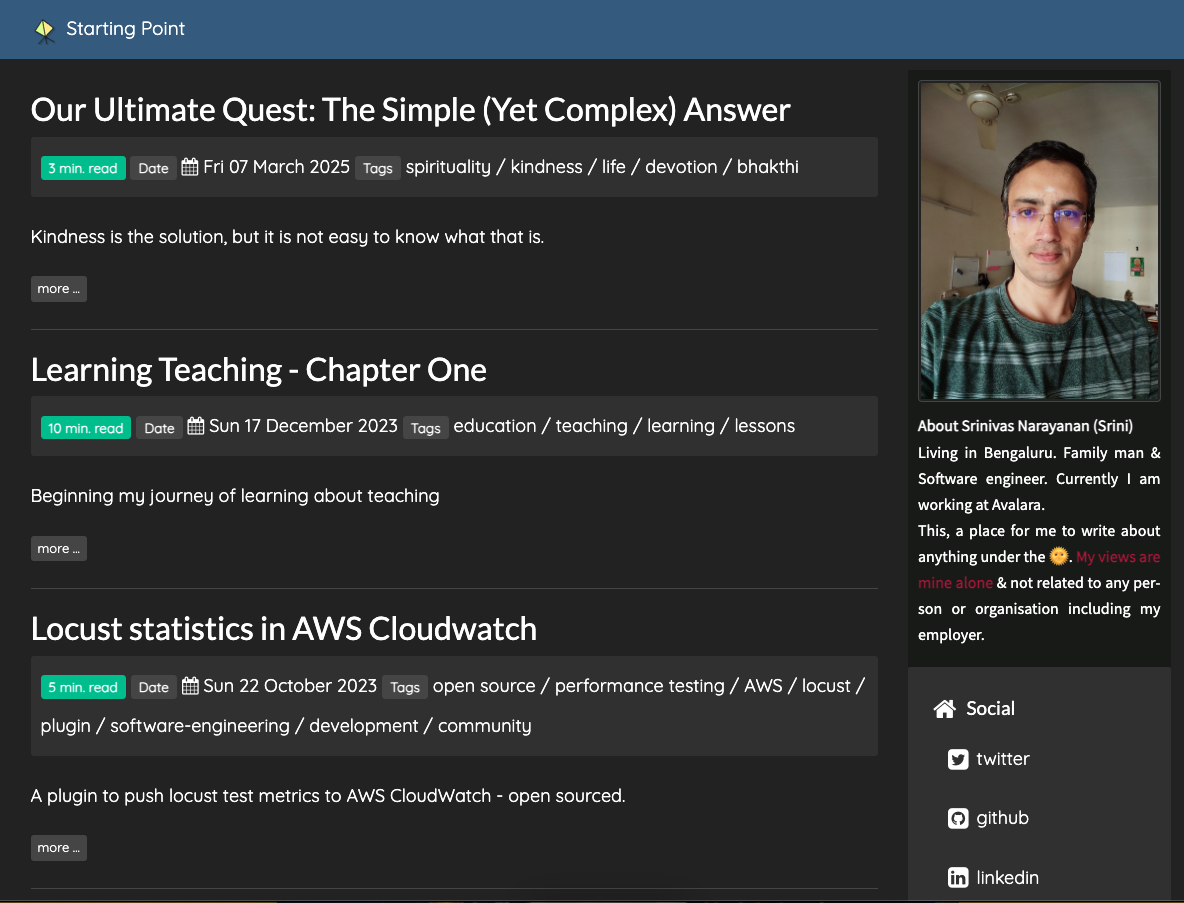
Before: the old Pelican homepage
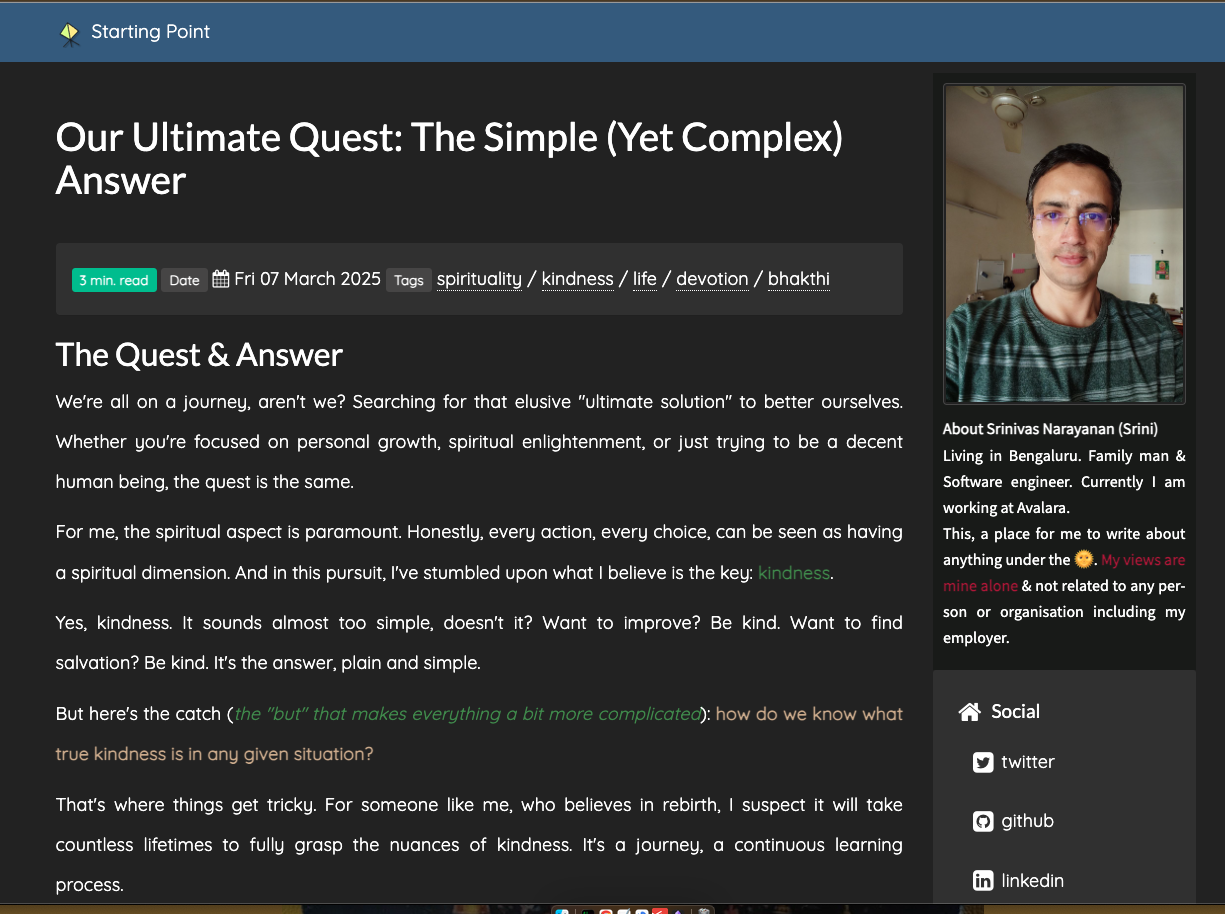
Before: an article page on the old Pelican site
This is what I was looking at. No dark/light toggle, no collapsible sidebar — just what you see.
That is how it started. What followed was an education in the decisions that actually matter — and a few that do not matter as much as they seem.
Why Hugo
Before committing to Hugo, I looked at the usual suspects — Gatsby, Eleventy, Astro, Jekyll. My criteria were simple enough:
Single binary — No node_modules. No Python virtualenvs. One binary, drop it into PATH, done. The distinction matters here: I am not building Hugo, I am using it. When you are using a tool rather than developing it, its runtime and dependency chain are pure overhead — and overhead that compounds the moment you stop paying attention to it, as the Pelican venv had just reminded me.
Speed — Hugo builds are measured in milliseconds. For a 25-post blog this barely matters on paper, but the feedback loop when writing matters more than raw numbers. hugo server -D gives me live reload while I type. That is a good writing environment.
Maturity — Hugo has been around since 2013. The ecosystem is stable, the documentation is thorough, and Stack — which triggered this whole thing — is actively maintained.
Theme override system — Hugo lets you override individual theme files by placing your version at the same relative path in your site’s layouts/ directory. You never need to edit the theme itself. This matters enormously if you want customisations but also want to receive theme updates safely without spending an afternoon resolving conflicts.
None of these were exclusive to Hugo. But together they made it the most comfortable choice. I can generate this entire site with hugo --minify --cleanDestinationDir and it finishes in under a second. That speed is genuinely satisfying.
URLs: The Decision You Cannot Undo
Early in the migration, Claude flagged URL structure as the thing to get right before anything else. The more I looked at it, the more obvious it was why: your URL structure is not easily changeable once you have an audience.
The old Pelican site served every article at https://www.nacnez.com/slug-name.html — flat, at the root, with a .html extension. Google had indexed these URLs. Disqus had attached comment threads to these exact URLs. Any reader who had bookmarked a post had pointed their bookmark at these URLs.
Hugo’s default is pretty URLs: /slug-name/index.html, served as /slug-name/. A valid, arguably cleaner convention. But for my situation, switching to pretty URLs would have:
- Broken every Google-indexed URL for this blog — Google treats
/slug-name.htmland/slug-name/as different pages, and would re-evaluate rankings from scratch - Disconnected every Disqus comment thread — Disqus identifies threads by their full URL, so an old thread at
/slug-name.htmlbecomes an orphan the moment the URL changes
The fix was two lines in hugo.toml:
uglyURLs = true

[permalinks]
    post = "/:slug"
uglyURLs = true tells Hugo to output /slug-name.html instead of /slug-name/index.html. The [permalinks] setting keeps articles at the root level — not nested under a year/date prefix like /2018/03/nginx-working-deepdive.html.
Just a simple two-line fix. The consequences of not adding them are not simple.
If you are starting fresh: this is still the decision you need to make before your first post. Pretty URLs (/post-name/) are cleaner and are what most Hugo sites use. Ugly URLs (/post-name.html) are better if you want to mirror a file-system or match an older tool’s output. Pick one and commit. Changing it on a live site means redirects, sitemap resubmission, and — if you have a comment system — a potentially painful thread migration.
Decide early. The internet remembers URLs.
The Migration: Scripted, Not Manual
Moving 25 posts from Pelican’s format to Hugo’s was not going to be a manual job. The Pelican posts used:
- No
---frontmatter delimiters — justKey: Valuelines at the top - A custom
{static}/images/path prefix for images - Custom markers like
|-|text|-|for inline coloured emphasis - Python-Markdown’s
!!! type "Title"admonition syntax for call-out boxes [TOC]markers that Stack handles automatically from headings
Rather than having Claude edit the files directly, I asked for scripts. My reasoning: if something converts wrong, you fix the script and re-run — you are not trying to unpick a chain of direct edits. Repeatable and deterministic. Claude wrote two Python scripts to handle the conversion:
migrate.py— the main conversion: Pelican frontmatter to YAML, field name normalisation, inline marker conversion to raw HTML spans, image path rewriting,[TOC]removal.admonition_fix.py— the follow-up: converted!!! type "Title" / indented contentblocks to Hugo shortcodes —{{< admonition type="type" title="Title" >}} content {{< /admonition >}}.
Both scripts still live in the scripts/ directory. One-time tools, kept for auditability.
The satisfying part: all 25 posts — some written in 2012, some in 2022, all with varying amounts of custom formatting — came through intact. Even the older technical posts like the Nginx deep dive, with its custom figures and architecture diagrams, converted cleanly. Credit to Claude for getting that right across the board.
The scripted approach also meant Claude could close the correction loop automatically — spot a conversion issue, fix the script, re-run it across all 25 posts in one go. No hunting through files individually, no manual corrections.
Customising Stack: 22 Overrides, Zero Theme Edits
Stack was the clincher — the theme that turned Hugo from an option into a decision. Beyond the dark mode and collapsible sidebars I had already noticed, it brought:
- Table of contents widget — auto-generated from headings, collapsible, right sidebar
- Categories, archives, and tag cloud widgets out of the box
- Disqus support configured with one line in
hugo.toml
What made Stack the right choice was not the feature list — it was the override system. Hugo lets you override any theme file by placing your version at the same relative path in your site’s layouts/ directory. You never need to edit the theme itself. Stack is designed with this in mind. Once that clicked, the question changed from “what does Stack give me?” to “what can I make it do?”
Every change lives in layouts/ or assets/scss/ in the site repo — not in themes/stack/. When Stack releases an update, I pull it without fear. My changes are untouched.
I directed 22 customisations across the install — reviewing output, specifying what needed changing. Claude built every one of them. Here is a sample of what those looked like:
- Sidebar collapse state saved to
localStorage— open or closed, remembered across page loads without any reader action. - Admonition callout boxes styled using Stack’s own CSS variables — dark/light switching is automatic, no hardcoded colours.
- Custom sitemap with 27 URLs instead of 150+ — Hugo’s default includes every tag, category, and pagination page; the override includes only real content.
BlogPostingJSON-LD structured data on every article — invisible to readers, legible to Google.- A
← Backbutton on article pages — returns readers to wherever they came from, pagination page and all.
The override system is useful for adding things Stack doesn’t have. It is equally useful for correcting things Stack gets wrong by default. The H1 heading fix is the clearest example. Stack renders the sidebar site name as <h1> and the article title as <h2> — the wrong hierarchy for SEO. On an article page, the article title should be <h1>. A template override in layouts/_partials/article/components/details.html fixes it. Invisible to readers, but it is the kind of thing Google’s crawlers notice.
Deployment: Two Repos, One Live Site
With the content migrated and the site customised, the last question is how it gets from a local build to readers.
GitHub Pages serves static content from a repository. The common setup is one repository with source on a branch and built output on another, with GitHub Actions doing the build automatically.
I went with a simpler approach: two separate repositories.
nacnez-site-new/— the Hugo source (content, config, theme, layouts, scripts)srininara.github.io/— the built output only
The more important reason first: GitHub Pages requires the srininara.github.io repo to be public. The source repo does not have to be. Keeping them separate means drafts, config, migration scripts, and everything else in the source repo stays private — only the built HTML output is ever exposed. For a blog where you might have half-finished posts or configuration you would rather not share, this matters more than any workflow convenience.
The workflow convenience is real too. srininara.github.io is a GitHub user pages repo, which GitHub Pages serves directly from master. Running hugo --minify --cleanDestinationDir -d ../srininara.github.io writes the full built site into the sibling directory. A git push in that repo is a deployment.
No GitHub Actions, no YAML pipeline, no build configuration to maintain. Just a build command and a push.
(I know some people will find this heretical. I find it clear. The trade-off is manual deployment — which I am fine with, because I want to review the build output before it goes live.)
The --cleanDestinationDir flag is worth understanding: it deletes everything in the output directory before writing the new build. This means the output repo always reflects the current source exactly — no stale files accumulating. One file worth knowing about: the CNAME for your custom domain. It gets deleted along with everything else — and recreated, because it lives in static/CNAME in the source repo and Hugo copies it on every build. Keep it there, not in the output repo directly.
SEO Setup: Don’t Leave It to Defaults
A live site and a findable site are not the same thing.
Hugo’s default sitemap includes every URL it generates — category pages, tag pages, paginated home pages, the search page. For a 25-post blog, that is 150+ URLs, most of them thin auto-generated pages with no real content. Submitting all 150 to Google Search Console is wasteful at best, and signals poor content quality at worst.
Three things worth doing that Hugo doesn’t do for you by default:
Custom sitemap — a template at layouts/sitemap.xml that includes only real content pages. My sitemap has 27 URLs: homepage, 25 articles, archives page — as of this writing. Google is much happier with that than with 150. Every new article is included automatically; tag and category pages are excluded automatically. Nothing to maintain.
Custom robots.txt — block tags/, categories/, and page/ (pagination) from crawlers. These URLs are still accessible to readers; they just don’t waste crawl budget. The rules are path-based, so new content is covered without touching the file.
JSON-LD structured data — BlogPosting schema on article pages, WebSite schema on the homepage. JSON-LD is a structured data format embedded in the page <head> that tells Google what a page is in machine-readable terms: title, author, publication date, description. Without it, Google infers these from page content. With it, Google can display richer search results and build a clearer picture of the author and site. Hugo provides none of this by default. A template at layouts/partials/structured-data.html, included from the custom <head> partial, handles it.
None of this is visible to readers. Getting it right took multiple passes — Claude generated an SEO best practices document first, then built each piece iteratively against it. I have not thought about it since — which is, I think, the definition of infrastructure done well. Getting there had a detour…
The Mistake That Cost Me an Afternoon
I tested social sharing using Facebook’s Sharing Debugger — paste a URL, see exactly what OG tags Facebook finds. No image card came up. The OG tags weren’t being picked up at all.
That prompted a check of the page source. The custom <head> additions were entirely absent — OG image, Twitter Card, GTM snippet, structured data, all of it. Stack was rendering its own default <head> with none of our additions.
Traced back to the file. Stack’s hook for custom <head> content is layouts/partials/head/custom.html — one call, one file, everything custom goes through it. During the migration, Claude had placed it all in layouts/partials/custom/head.html instead. Reasonable-looking path. Wrong one. Stack never calls that partial. It sat there as dead code while the correct file did not exist.
Stack’s template lookup for custom head content is partial "head/custom.html".
This maps to layouts/partials/head/custom.html in your site.
Not layouts/partials/custom/head.html. That path is never called.
Once the correct file was in place, everything snapped into alignment. The Facebook debugger showed the card.
(Easy to miss and worth sharing — someone will hit the same wall. Now you won’t.)
What I Left Out
This post covers the decisions I found most consequential.
The ogImage vs image frontmatter distinction — three cases to understand. If a post has image: set, Stack renders it as a hero banner on the page and uses it for OG/social tags — both happen together. If a post has ogImage: set instead, that goes only into the <head> for social sharing, with no banner rendered. If neither is set, a default fallback image (/images/default-social.jpg) is used for the OG tag. The customisation ensures every page has some OG image regardless — and gives the option of a social card without a visible banner.
The custom admonition shortcode — Pelican’s Python-Markdown had !!! admonition syntax. Hugo has no built-in equivalent. Claude wrote a shortcode that outputs the same <div class="admonition {type}"> HTML and styled it using Stack’s own CSS variables for automatic dark/light handling.
The collapsible sidebars — Stack has no built-in collapse mechanism. Both sidebars collapse by default on article pages — maximising reading space — and expand when you click the toggle. Both remember your preference in localStorage across page loads. This required template overrides, custom CSS, and JavaScript — but it is one of the first things readers notice.
The custom font — Stack’s default is a system font stack. This site uses Quicksand, which is a cleaner, more readable choice for long-form writing. The easy path is loading it from Google Fonts via a single @import line. The better path — which is what runs now — is downloading it and serving it locally from static/fonts/. No DNS round-trip to Google on every page load, measurable improvement in LCP. The switch from remote to local took about ten minutes and is worth doing.
The full details of all 22 customisations are in the source repo, which is private. If you are building on top of Stack and want to understand how any of this works, drop a question in the comments below — happy to share specifics.
Before and After
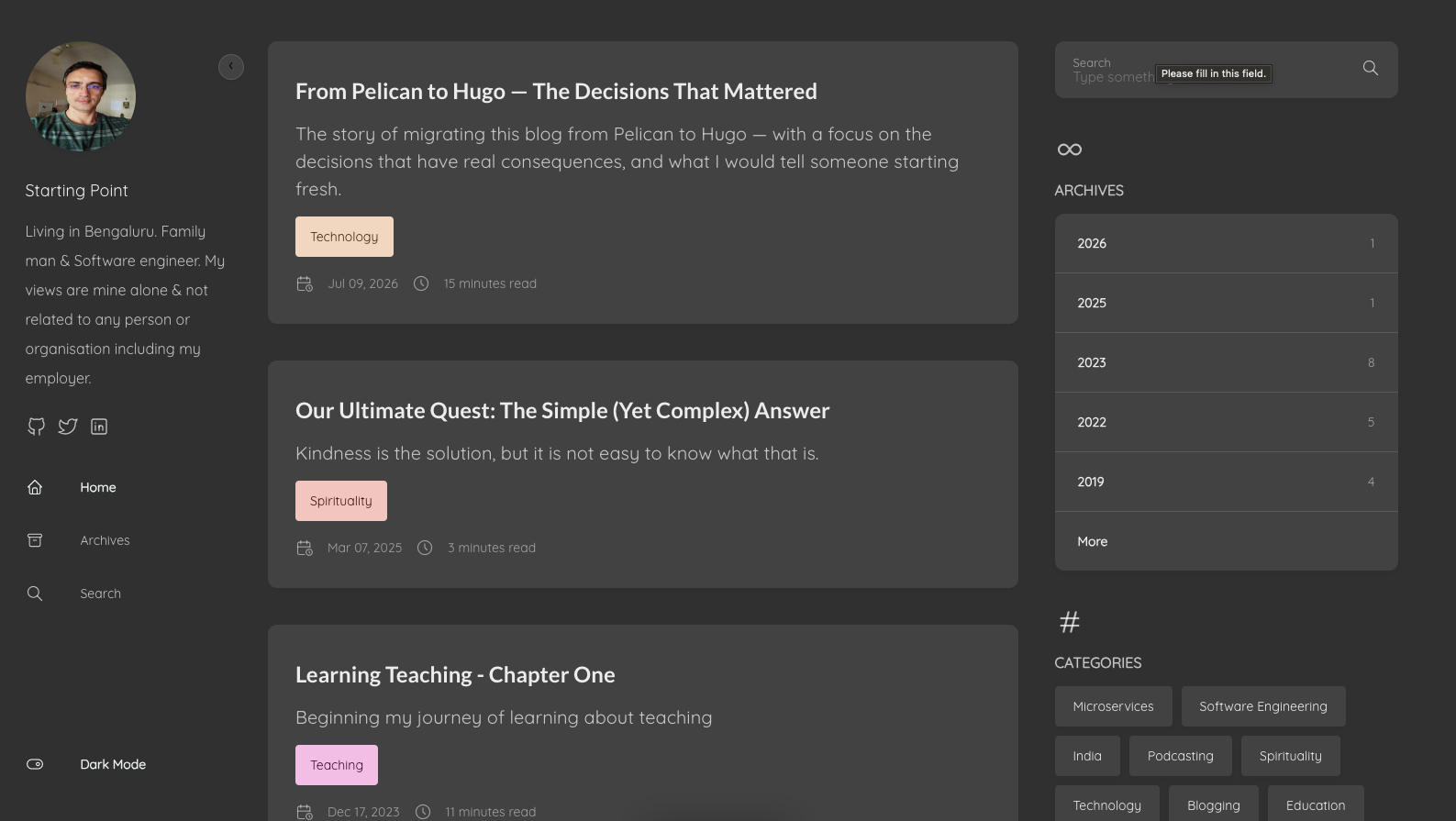
After: the new homepage, dark mode
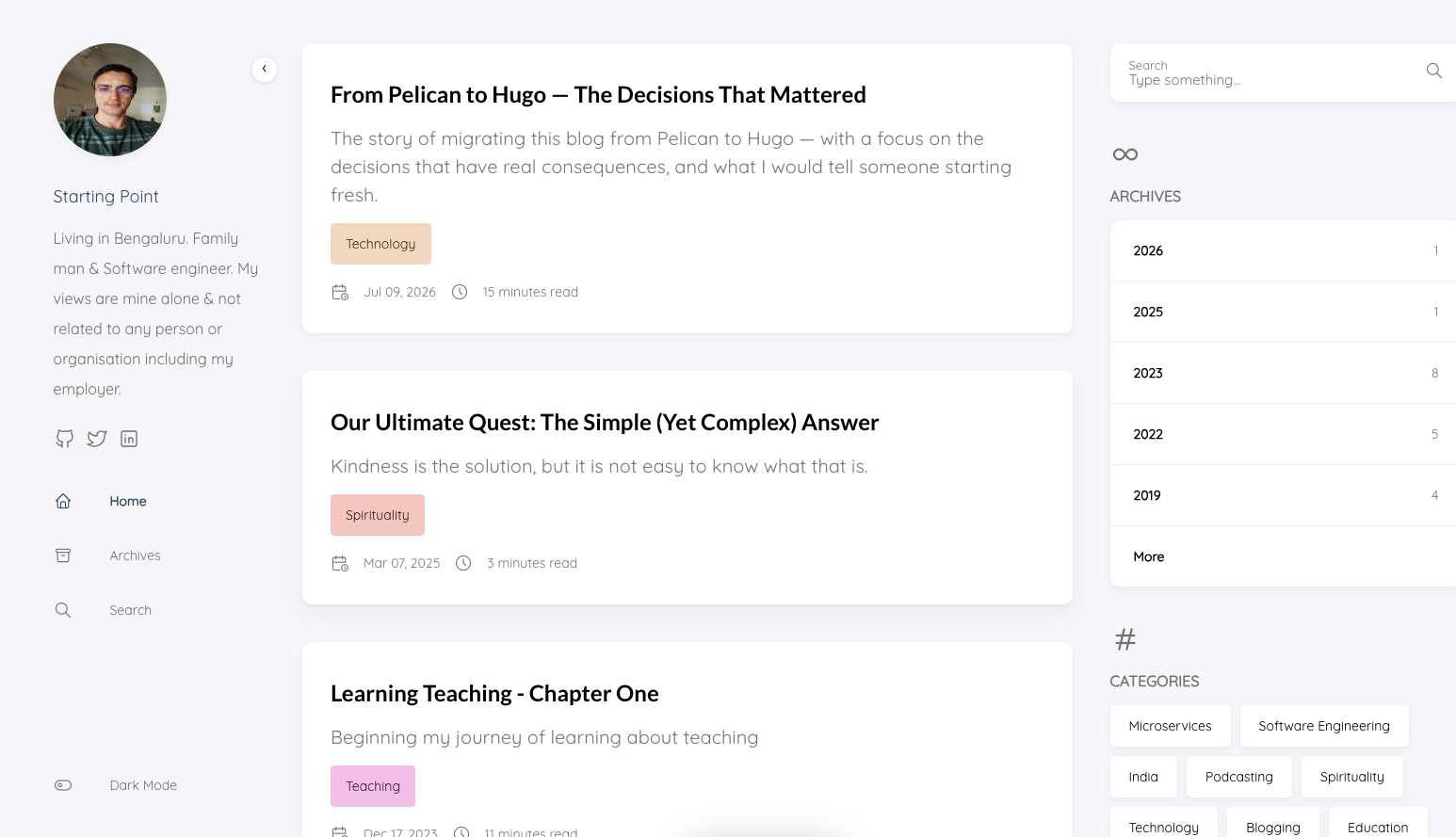
After: the new homepage, light mode — still a work in progress
Dark mode is where this theme feels right. Light mode on the homepage still needs work — I have not spent the time tuning it yet.
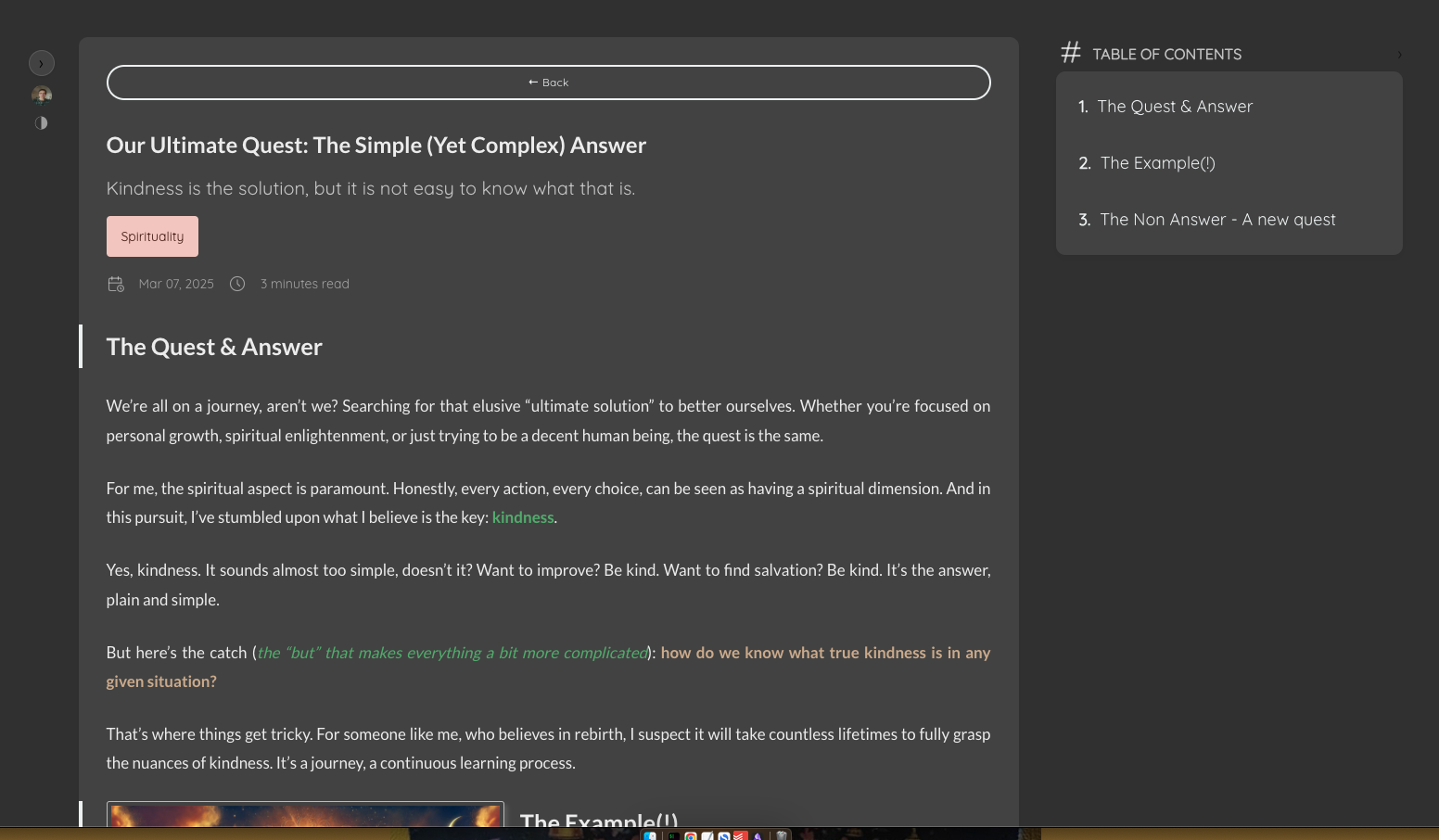
After: an article page, dark mode
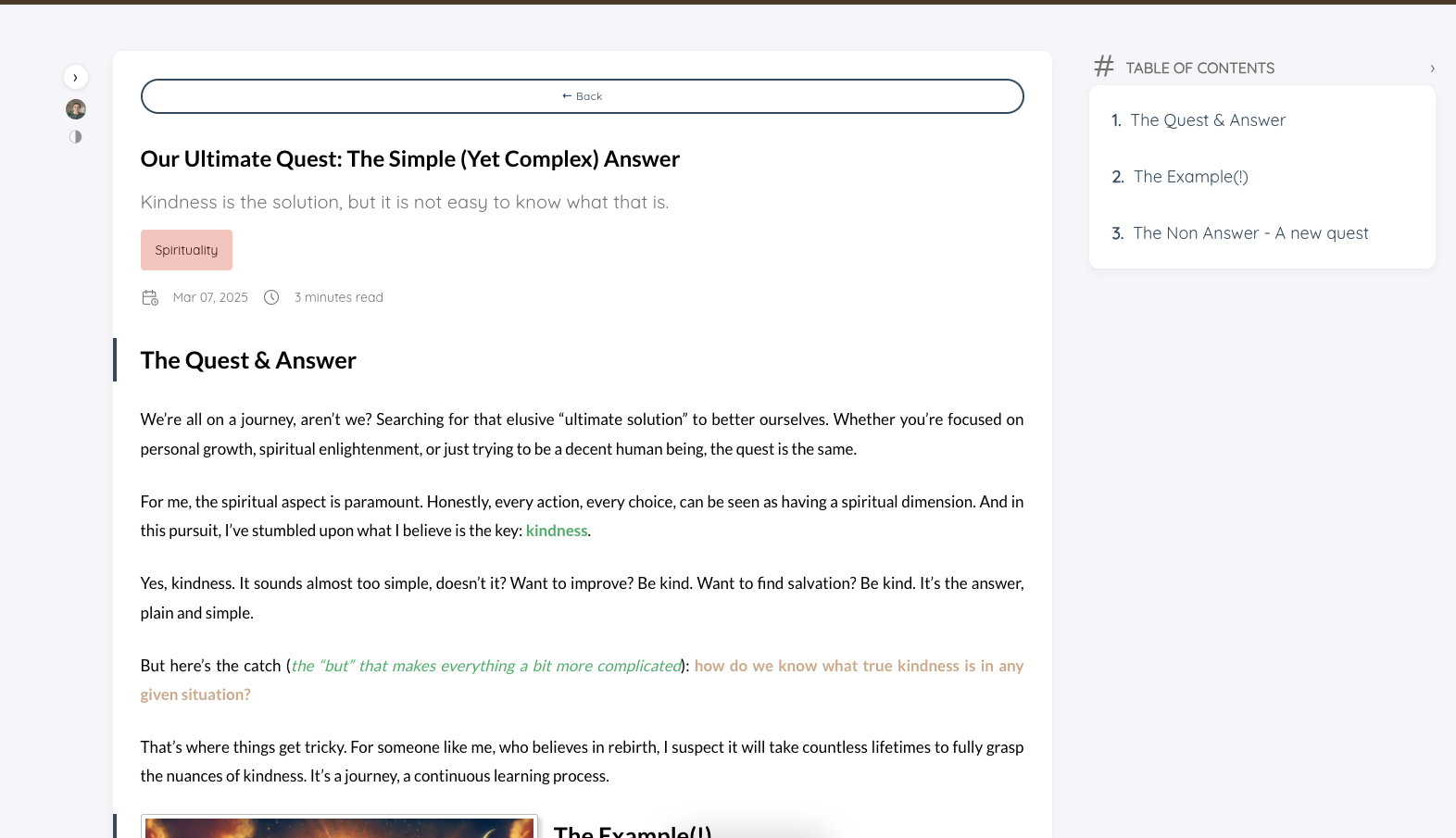
After: the same article, light mode
Same content, same URL, a theme that actually gives readers a choice.
The Hugo Switch: Was It Worth It?
Yes, without much hesitation.
The site is faster. The theme is far more capable than anything I had on Pelican. The writing experience — edit in Markdown, preview with hugo server -D, build and push — is clean and dependable. This very post was drafted in that workflow.
I keep coming back to a more fundamental need: when the infrastructure is settled, it disappears from your attention. That is the whole point. Not the theme, not the sitemap, not the build command — those are means. The writing is the end.
The parts that surprised me:
The URL question is the first question, not the last. I treated it as a configuration detail. It is a commitment. If you are migrating a site that search engines have indexed, or that has a comment system, decide your URL structure before everything else.
Theme choice is downstream of customisation philosophy. I did not choose Stack only for its looks. I chose it because Hugo’s override system — which Stack is designed to work well with — means I can modify the theme without forking it. Forks of themes accumulate maintenance debt. Overrides do not.
Good defaults are underrated. Hugo does a lot right — RSS, sitemap structure, pagination, Disqus integration. The things it doesn’t do (SEO structured data, clean sitemap) are all fixable with templates. I never felt like I was fighting the tool.
If you are in the middle of a Hugo migration and hitting a wall on something I haven’t covered here, drop a question in the comments. And yes — those Disqus threads, some of them from 2015, survived the migration completely intact.
References
- Hugo documentation — uglyURLs — the option that preserved all my URLs; read this before committing to a URL strategy
- Hugo template lookup order — essential reading before writing any override; would have saved me the
custom/head.htmlmistake - Stack theme — the theme used on this blog
- Disqus URL migration tools — if you ever need to migrate comment threads to new URLs
- IndexNow protocol — near-instant indexing on Bing and DuckDuckGo after publishing; worth setting up
- Open Graph protocol — the spec behind
og:imageand social sharing meta tags - Schema.org BlogPosting — the structured data type used for JSON-LD on article pages
- Facebook Sharing Debugger — paste any URL to see exactly what OG tags Facebook finds; the tool that surfaced the wrong file path mistake